Syntax Highlighter

jueves, 26 de abril de 2018

Microsoft Regional Director

ProfileHoy es uno de esos días que merece una entrada en este blog, una distinta de las habituales entradas técnicas que suelo apuntar tras pegarme unas cuantas horas persiguiendo la solución a un problema técnico.

Y es que hoy es un día para alegrarme, ya que acaban de premiarme con el honor de pertenecer al programa Microsoft Regional Director. ¿Qué significa? Pues muchísimo, pero nada mejor que el resumen expuesto en http://rd.microsoft.com

“El Programa Regional Director ofrece a los líderes de Microsoft los conocimientos del cliente y voces del mundo real que necesita para continuar empoderando a los desarrolladores y profesionales de TI con las herramientas, servicios y soluciones más innovadoras e impactantes del mundo.

Establecido en 1993, el programa consta de 150 de los principales visionarios de la tecnología elegidos específicamente por su comprobada experiencia multiplataforma, liderazgo comunitario y compromiso con los resultados comerciales. Por lo general, encontrarás a los Directores Regionales en los principales eventos clave de la industria, liderando grupos comunitarios e iniciativas locales, dirigiendo empresas enfocadas en la tecnología o consultando e implementando el último avance dentro de una corporación multinacional”.

Y es que este reconocimiento no solo tiene que ver con la trayectoria técnica que he ido desarrollando durante mi carrera profesional, sino también con la dedicación orientada al cliente y a resultados, labor a las que he estado dedicado todos estos años tras haber cofundado Intelequia. Muchísimas gracias a tod@s l@s que de algún modo u otro han hecho realidad este reconocimiento: a los miembros de la comunidad; al grupo de usuarios TenerifeDev; a los compis MVPs y RDs con los que no hemos parado de disfrutar haciendo eventos (mención especial a Tibi Covaci por la nominación); a todos los miembros de la propia Microsoft con los que es un placer trabajar; a los compañeros en el trabajo que siguen empujando como el primer día; a la familia que me hace disfrutar del breve tiempo del que disponemos; y en especial a Carmen Martín, que ha sido la compañera de viaje con la que sin duda no sería ni la mitad de lo que soy hoy.

Os dejo las FAQs del programa Microsoft Regional Director, que también están disponibles en http://rd.microsoft.com


Do Regional Directors work for Microsoft?

No, Regional Directors are not employed by Microsoft. In some cases, Regional Directors or their companies may have contracts to deliver goods or services to Microsoft but they are not employees.

How are Regional Directors selected by Microsoft?

Regional Directors are hand-picked by Microsoft based on a rigorous set of evaluations designed to help us select the best representatives of developer, IT pro, and strategic technology needs of the world's most impactful businesses.

How long is a Regional Director's term?

A Regional Director's term is two years.

How do Regional Directors work with Microsoft?

Regional Directors act in a non-paid advisory capacity with Microsoft. On an ongoing basis, RDs are asked to participate in scheduled strategic feedback sessions with Microsoft senior leadership teams. Because of their community leadership positions, passion, commitment to technology and business excellence, RDs have a regular outlet where they can express real-time customer and community feedback directly with Microsoft engineers and the senior leadership team, including Satya.

I'd like to become a Regional Director and believe I meet the qualifications. Is this possible?

We actively search for amazing leaders. RD nominees come from Microsoft senior-level full-time employees or other RDs. If you have a relationship with either of those you should express your interest. We open up the nominations once a year, typically in January. Usually we have very few available slots and hundreds of candidates but we are continually looking for new leaders to step in.

Do Regional Directors have specific technology expertise?

We like to think of RDs as technology generalists. Most of them have significant technology backgrounds but have progressed their careers to the point where they have architect level depth across both Microsoft and non-Microsoft platforms. This uniquely helps qualify them to work with our product teams to understand the needs of all customers which ultimately helps us build better products.

What is the difference between an RD and an MVP?

Many of our RDs also carry the MVP award title, although most of them are finding it harder to maintain both credentials as each has different demands on the member's time which makes it difficult to qualify and maintain both. However, the key differences really come down to the business consultative nature, customer experience, and cross platform architect skills possessed by RDs versus the deep technical focus which qualifies an MVP.

sábado, 25 de noviembre de 2017

DNN Azure AD Provider 3.0

Hi! After another bunch of work with React and the DNN Persona Bar, and with the special collaboration of Microsoft Azure MVP Cesar Abreu (@cesabreu), the new version of the DNN Azure AD Provider has been published.

Download DNN Azure AD Provider 3.0 from GitHub

There are several features on this release:

  • New Persona Bar integration: the Azure AD provider now has an area on the persona bar to easily setup the provider without having to dig into the authentication providers submenus. This area was also needed to have an starting point for the new features coming on the next release such as role sync and claims/profile mapping);
  • Auto-redirect: when you are only using the Azure AD provider, you would probably like to directly go to the AD login page without doing a previous stop on the DNN login page. This option just make this. If you still need, as an admin, to login with DNN credentials when this option is enabled, you can pass “legacy=1” on the query string of your login page in your browser so you can login as a regular DNN user. In any case, remember you can make a Azure AD user as super user of your site;
  • Setup simplification: on the previous releases, two applications needed to be setup in your Azure AD. This has now been simplified and only one App registration is needed. The other parameters have been simplified as well, so you only need to specify the Azure Tenant ID, the App ID and secret. Check the setup instructions on GitHub.
  • Logout: when I initially created the provider, followed the other DNN authentication providers patterns (Twitter, Google, etc.) where the logout process is not actually implemented, so when logging out, the user is logged out from DNN but the OAuth token is not expired on the OAuth provider. On this release, the logout process is fully implemented, so both the DNN cookie and the OAuth token are correctly expired. Check the video below:

AzureADProvider30_e

Apart of these new features, other bugs have been fixed.

The project is available on GitHub as always:

Un saludo y happy coding!

DNN Azure AD Provider 3.0

Hi! After another bunch of work with React and the DNN Persona Bar, and with the special collaboration of Microsoft Azure MVP Cesar Abreu (@cesabreu), the new version of the DNN Azure AD Provider has been published.

Download DNN Azure AD Provider 3.0 from GitHub

There are several features on this release:

  • New Persona Bar integration: the Azure AD provider now has an area on the persona bar to easily setup the provider without having to dig into the authentication providers submenus. This area was also needed to have an starting point for the new features coming on the next release such as role sync and claims/profile mapping);
  • Auto-redirect: when you are only using the Azure AD provider, you would probably like to directly go to the AD login page without doing a previous stop on the DNN login page. This option just make this. If you still need, as an admin, to login with DNN credentials when this option is enabled, you can pass “legacy=1” on the query string of your login page in your browser so you can login as a regular DNN user. In any case, remember you can make a Azure AD user as super user of your site;
  • Setup simplification: on the previous releases, two applications needed to be setup in your Azure AD. This has now been simplified and only one App registration is needed. The other parameters have been simplified as well, so you only need to specify the Azure Tenant ID, the App ID and secret. Check the setup instructions on GitHub.
  • Logout: when I initially created the provider, followed the other DNN authentication providers patterns (Twitter, Google, etc.) where the logout process is not actually implemented, so when logging out, the user is logged out from DNN but the OAuth token is not expired on the OAuth provider. On this release, the logout process is fully implemented, so both the DNN cookie and the OAuth token are correctly expired. Check the video below:

AzureADProvider30_e

Apart of this new features, other bugs have been fixed.

The project is available on GitHub as always:

Un saludo y happy coding!

sábado, 9 de septiembre de 2017

DNN Redis Caching Provider 3.0

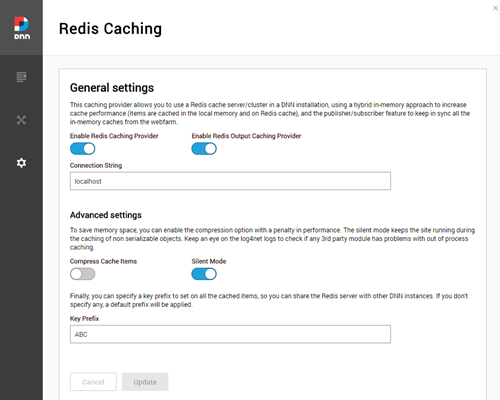
Hi again! Following up with the DNN module updates, I have done some modifications on the DNN Redis Caching provider so it can be configured now through the DNN Persona bar.

The summary of changes of this release is:

  • Changed the minimum required DNN version to 9.0.1
  • Refreshed nuget packages including the latest version of StackExchange.Redis 1.2.6
  • Added configuration UI in the Persona Bar. Now the provider is not automatically enabled during installation, you need to use the new UI.
  • The Redis client automatically reconnects after a Redis connection failure

RedisCaching

If you have any interesting idea to add on the settings area, please let me know. I have thought on implementing a redis-cli command line interface, but I believe that would be better to wait for DNN 9.2 and implement that as a “DNN Prompt” command (see http://www.dnnsoftware.com/community-blog/cid/155417/dnn-prompt-making-dnn-admins-power-admins-via-the-command-line)

Hope this helps.

Un saludo and happy coding!

Building an Evoq Liquid Content chatbot with Azure Bot Service

dnnrecipes2A few months back we spent some days working in an internal hackathon at DNN Corp. called DNN Developer Days that allowed to explore the power of Evoq Liquid Content APIs. The result was an awesome set of project examples giving a glimpse of what you can do when integrating the APIs to publish and reuse the content through different channels, such as Amazon Echo, Azure Bot Service or a smart TV, including AI and machine learning capabilities such as tagging your site images automatically. You can explore all of them at http://builtwithdnn.com website, I hope you find them interesting.

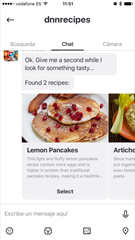
I personally worked on an Azure Bot Service chatbot, exposing the contents of a recipes website through different channels like Skype, Facebook Messenger, Telegram or Teams. You can quickly play with the example at http://builtwithdnn.com/recipesbot/ 

IMG_0365 IMG_0366 IMG_0367

All the documentation and source code for each project is available on a GitHub repository at https://github.com/dnnsoftware/Dnn.Evoq.LiquidContent.Samples.Public/ 

Chatbot as a Channel: Integrating Liquid Content with Azure Bot Service

Integrating Artificial Intelligence (AI) into your site or application is easier than you think. Companies like Google, Microsoft and Amazon are making big bets on AI and machine learning. All three companies provide freely available toolkits and services that developers can use to integrate AI into our applications.

The recipes bot integrates with messaging apps like Skype, Telegram or Facebook Messenger. As a Skype user, for example, you can provide the bot with a list of ingredients. The bot connects to Liquid Content to retrieve recipes that contain those ingredients, then provides an answer to the Skype user.

This is just the beginning. I plan to connect more third-party services to the recipe bot, such as LUIS, Cortana, Vision API and Apple Pay.

Bookmark this page and check back here to get updates. I’ll update the page each time there’s news to share. You can also follow me on Twitter @davidjrh and I will mention the new additions there.


Building the Recipes Bot

In this tutorial, I show you how I built the recipe bot. The bot uses the Azure Bot Service, the intelligent, serverless bot service that scales on demand. With this service, you will be able to publish your bot through multiple channels without managing or patching any server. It can connect to additional messaging apps without writing or adding new code. The service is free, and you will only pay for the resources you consume.

ArchitectureGetting Started

Prerequisites

To follow the tutorial, you will need:

  • An active Azure subscription. You will need to login as owner of the subscription to host the bot service. You can sign up for a free subscription here.
  • An Evoq Content or Engage site with Evoq Liquid Content enabled

Also, to debug your C# bot locally using breakpoints in Visual Studio you will need:

For more information about how to setup the debugging environment, visit Debug with the emulator and Debug an Azure Bot Service C# bot on the bot framework documentation.

Content Index

  1. Setting up the recipes
  2. Creating the basic bot
  3. Setup continuous integration
  4. Debugging the bot on your local environment
  5. Customizing the basic bot
  6. Test your recipes bot
  7. Adding a webchat in your site
  8. Known issues

Hope this helps.

Un saludo and happy coding!

Related Posts Plugin for WordPress, Blogger...