Syntax Highlighter

Mostrando entradas con la etiqueta Visual Studio. Mostrar todas las entradas

sábado, 18 de marzo de 2017

Visual Studio 2017 Launch Event con TenerifeDev

VS2017Launch

El próximo 23 de abril de 2017 a las 17:30 en el Salón de Grados de la ESIT tenemos un nuevo encuentro con TenerifeDev, dentro de los eventos globales que se están realizando sobre las novedades de Visual Studio 2017. Si quieres conocerlas, no te pierdas este evento en el que hablaremos de ellas y las podremos probar.

Contenidos:

• Novedades en Visual Studio 2017

• Desarrollo con Xamarin en VS 2017

• Data Tools

• Debugging, Unit Testing, Live Code Analysis, Intellisense

• Continuos Delivery and Deployment

Contaremos con:

• Santiago Porras, MVP Windows Platform (@saintwukong)

• Eickhel Mendoza, MCSA Cloud Platform (@eickhel)

• César Abreu, MVP Azure (@cesabreu)

• David Rodríguez, MVP Azure (@davidjrh)

Más información y registro en https://www.meetup.com/es-ES/TenerifeDev/events/237759368

miércoles, 18 de enero de 2017

Microsoft Tour, Workshop de Xamarin, Azure Functions y Machine Learning el 30 de Enero

El próximo 30 de enero, dentro de la gira de Microsoft por las universidades de España, vamos a tener el placer de tener varias sesiones relacionadas con bots, Azure, Machine Learning y Xamarin de mano de los cracks del departamento de DX (Developer Experience) de Microsoft.

Para que los tengas todos a mano:

  • 10:00 – 14:00 Microsoft Tour en la Universidad de la Laguna https://www.meetup.com/es-ES/Clubs-NET-Spain/events/235624825/
    ¿Eres un estudiante técnico? ¿Apasionado de la tecnología? ¿Emprendedor nato?
    Microsoft Academic Tour llega a la Universidad de la Laguna gracias al Club .NET para enseñarte las últimas novedades en herramientas cross-platform, que tienes a tu alcance y que están usando la gran parte de empresas y startups.
    ¿Dónde? Salón de Grados de la ESIT
  • 16:00 – 18:00 Workshop Xamarin is coming en ULL https://www.meetup.com/es-ES/Clubs-NET-Spain/events/235927143/
    El día 30 de enero, en el Aula 2.3 de la Escuela Superior de Ingeniería y Tecnología de la Universidad de la Laguna, podrás aprender a crear tu propia aplicación para Windows, Android e iOS en una tarde. Yo que tú, no me lo pensaba dos veces :) ¿Te imaginas poder crear un Whatsapp 2.0? ¿Y un Pokemon Go 2.0? Es más fácil de lo que te imaginas, y te queremos a enseñar cómo.
    ¿Dónde? Aula 2.3 Escuela Superior de Ingeniería y Tecnología
  • 18:00 – 19:30 Azure Functions y Machine Learning con TenerifeDev y Microsoft https://www.meetup.com/es-ES/TenerifeDev/events/236225160/
    Estamos de suerte. Aprovechando que vienen los compis de Microsoft durante estos días en su gira por España, tendremos una sesión especial en TenerifeDev en el que hablaremos de dos temas de actualidad: Azure Functions y Machine Learning.
    ¿Dónde? CIFP César Manrique

¡Chacho, que te lo pierdes!

sábado, 14 de mayo de 2016

Password is expired when using Visual Studio Release Management

Today I was investigating an issue on Visual Studio Online Release Management, getting deployment error related to the Azure credentials used for the deployment operation

Password is Expired summary

When going to the log details, the error happens on a resource manager task. The logs show that the password of the user account used to connect to Azure has expired.
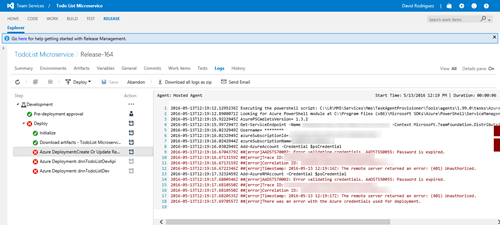
Password is Expired

And here comes something to highlight, because the configuration of the service connection between VS Online and Azure has evolved in the latest months, to support both Azure Classic and Resource Manager models. Also note that the tasks you can configure on Visual Studio Release Management can work with one of these models or both. Let me show with an example.

Configuring Azure service connection on VS Online Release Management

To setup the Azure connection on Release Management, you need to click on the “Manage Project”

ManageProject

Once there, go the “Services” tab and when clicking on the “New Service Endpoint” you will see two ways to connect to Azure: Azure Classic and the new Azure Resource Manager. A few months back there was an only option to support Classic and RM scenarios, but this changed later. The main difference now is the way each connection authenticates with Azure

SNAGHTMLd1dcd0b

So a big difference here is the use of a service principal on Azure Resource Manager connections instead of using a user principal when using Azure Classic connections. This is important for our case, because the “Password is expired” error message we got refers to a user principal, not to a service principal where the “password” and “expiration” concepts are different.

Note that depending on the task used on Release Management, you can use one or other connection, or only the Classic connection. For example:

Fixing the “password is expired” issue

Once we understand these concepts, we have just to fix the password expiration issue. The solution has two steps:

  1. Change the password of the user principal and then update the Azure Classic connections with the new password. Note: You should use a long/very strong password for these user principals because of the second step; service principals come to play to stop using user principals in the future;
  2. To avoid this to happen again, change the password expiration policy for this account to don’t expire.

The first step can be easily done manually. For the second step, we need the help of Azure AD PowerShell module.

Install Azure AD PowerShell module

On this MSDN article you can find all the information related to managing Azure AD via PowerShell: https://msdn.microsoft.com/en-us/library/jj151815.aspx The Azure AD module is supported on the following Windows operating systems with the default version of Microsoft .NET Framework and Windows PowerShell: Windows 8.1, Windows 8, Windows 7, Windows Server 2012 R2, Windows Server 2012, or Windows Server 2008 R2. You need to install two utilities:

Connecting to Azure AD

Once you have installed both utilities, to start using all the Azure AD cmdlets just open a PowerShell command prompt.

$msolcred = get-credential
connect-msolservice -credential $msolcred

Obviously you need to introduce admin credentials if you want to use the administrative cmdlets later, like changing the password expiration policy.

Change the user principal password expiration policy

Once logged in, we can just change the password expiration policy for the user with this script:

# Gets the current policiy value
Get-MsolUser -UserPrincipalName "releasemanagement@mytenant.onmicrosoft.com" | select PasswordNeverExpires

# Changes the policy to never expire
Get-MsolUser -UserPrincipalName "releasemanagement@mytenant.onmicrosoft.com" | Set-MsolUser -PasswordNeverExpires $true

There is a good blog post about this at https://azure.microsoft.com/en-us/documentation/articles/active-directory-passwords-set-expiration-policy/

What happens with service principals? Passwords never expire?

Service principals works in a different way. When you create a service principal, you can specify the StartDate and EndDate for the security principal credential (by default, StartDate=Now; EndDate = Now + 1 Year). You can change the EndDate in a similar way (is not a boolean flag, you need to set the EndDate).

For more information, visit the MSDN article https://msdn.microsoft.com/en-us/library/dn194091.aspx

martes, 12 de enero de 2016

Visual Studio AppInsights module for DNN

DNNLovesAppInsightsAs a website developer or operator, I always need to know if my site goes down and get an alert, verify if the site is performing well or if it is under an attack. There are lot of tools today to give you an insight on what is happening on your web deployment, and one I’m using more and more is Visual Studio Application Insights.

While AppInsights is still a “Preview” service (note that preview means that is not generally available, so no SLA is offered yet), you can start from a Free tier that probably fits the majority of small websites, and optionally start paying depending on the amount of telemetry data you send to the store. This gives to you a powerful insight and tools to operate, diagnose and fix issues immediately.

“With great power comes…great number of alerts!” – David Rodriguez

I’m not going to start selling you all the benefits of using AppInsights or another service such as NewRelic. I’ve been personally using them both for a long time, and while NR has been on the first position on my insights tools list, now I’m getting very excited on what AppInsights is offering today. Here a few interesting highlights for DNN website developers and owners:

  • Monitor the usage and performance of live apps
  • Get immediate alerts on performance or availability issues
  • Get telemetry for existing web apps without redeploying
  • Use for a wide range of app types on devices, servers, or desktops
  • Monitor ASP.NET web apps hosted anywhere: on Azure, other cloud services, or on-premises servers
  • Search traces and exception logs for failure diagnoses (including DNN Event logs and log4net logs!!)
  • Track events, metrics, page views, users, crashes, dependencies, perf counters, and response times

AppInsights module for DNN

The only thing that perhaps is not easy and not documented at all, is how to setup AppInsights on a DNN instance. While I’ve been doing the task manually for a while, I have finally created a simple module available at https://github.com/davidjrh/dnn.appinsights that allows, on this initial version:

  • Easily setup AppInsights on a DNN Platform or Evoq installation as a Host user
  • Automatically send telemetry data to AppInsights:
    • Http requests information
    • Page views
    • Server and browser exceptions
    • Trace information including the log4net logs information
    • DNN event log entries with a new logging provider
    • Performance counters

There is still space for improvement, like adding UI to specify which performance counters you want to add (currently you have to manually edit the ~/ApplicationInsights.config file for this task). Feedback is welcome! Pull requests are welcome!

And that is not all since more features are continuously being added to AppInsights. Can you imagine a service that automatically learns how your site is being used and alert you if an abnormal pattern is detected? You would like to contact AppInsightsML@microsoft.com to try it out!

ProactiveDetection

Getting started

This module is a DNN Platform extension to integrate Visual Studio Application Insights to monitor your DNN installation. To setup the module on your installation, follow these steps:

  1. Provision a new AppInsights service following the guide at https://azure.microsoft.com/en-us/documentation/articles/app-insights-overview/. Ensure you choose "ASP.net web application" on the "Application Type" parameter
    CreateAppInsights
  2. Once provisioned, copy the "Instrumentation Key" available on the resource Essentials properties
    InstrumentationKey
  3. Now from the Releases folder https://github.com/davidjrh/dnn.appinsights/tree/master/Releases, download the latest module package version ending on "...Install.zip" (the Source.zip package contains the source code that is not needed for production websites).
  4. Install the extension package in your DNN instance from the "Host>Extensions" menu like any other module
  5. Once installed, a new menu under "Host (Advanced menu)>Application Insights" will allow you to paste the instrumentation key obtained on step 2. After applying the changes, you will start receiving data on AppInsights after a few minutes.
    ModuleSetup

What changes are done on my site?

Some changes are done during the installation and other when Enabling the Application Insights module. Note that by default, until you enable the module and specify an instrumentation key, any AppInsights module or assembly will be loaded and no telemetry data will be sent.

During the install, the following assemblies will be added to the ~/bin folder:

  • DotNetNuke.Monitoring.AppInsights.dll
  • Microsoft.AI.Agent.Intercept.dll
  • Microsoft.AI.DependencyCollector.dll
  • Microsoft.AI.PerfCounterCollector.dll
  • Microsoft.AI.ServerTelemetryChannel.dll
  • Microsoft.AI.Web.dll
  • Microsoft.AI.WindowsServer.dll
  • Microsoft.ApplicationInsights.dll
  • Microsoft.ApplicationInsights.TraceListener.dll
  • Microsoft.Web.XmlTransform.dll

After enabling the module, the following configuration files are changed, in order to send telemetry, dot4net logs tracing and DNN event logs to AppInsights:

  • /Web.config
  • /ApplicationInsights.config
  • /DotNetNuke.log4net.logs
  • /DesktopModules/AppInsights/js/appinsights.js

If you disable or uninstall the module, all the previous changes are reverted.

The following image illustrates the DNN event log data being sent to AppInsights, where you can search or filter by content, and why not, create some alerts based on any criteria.

EventLogProvider


Resources

viernes, 20 de noviembre de 2015

Si te perdiste Connect(); vente a ReConnect(); con TenerifeDev

ReConnectTenerifeDev

Los días 18 y 19 de noviembre hemos podido ver en vivo y en directo el evento Connect 2015, donde desde Nueva York se nos han presentado el presente y futuro de las herramientas y servicios de Microsoft para una nueva era de desarrolladores.

“El papel de los desarrolladores está cambiando dramáticamente en el mundo de hoy, y Microsoft también lo está haciendo. Hace un año comenzamos un viaje para un nuevo Microsoft para desarrolladores, al presentar el futuro de un .NET de código abierto en Linux y Mac, y Visual Studio gratis para apuntar a cualquier dispositivo y sistema operativo.”

Así rezaba la introducción de la KeyNote de Scott Guthrie, en un discurso lleno de anuncios y demostraciones, mostrando los siguientes pasos de la transformación de Microsoft con las herramientas y servicios que ayudan a los desarrolladores a tener éxito en esta nueva era.

ReConnect();

TenerideDev y otras comunidades técnicas a lo ancho y largo del territorio español, hemos querido acercarte la repetición de las jugadas más interesantes en un evento resumen llamado ReConnect(); siguiendo la idea del edición anterior. Para ello, hemos desplazado a enero la próxima charla que teníamos programada para hacerle hueco a este pedazo de evento donde veremos cosas como compilar .NET nativo para Linux desde Visual Studio. What?? Sí, lo que oyes, estos suecos se han vuelto locos.

Evento: ReConnect() 2015
Fecha: 17 de diciembre de 2015
Lugar: Salón de Grados de la Escuela Superior de Ingeniería y Tecnología (anteriormente ETSII)
Horario: 16:30 a 19:30 (con descanso incluido)
Speakers: Santiago Porras (@saintwukong, Windows Platform MVP), Cesar Abreu (@cesabreu, Azure MVP), David Rodriguez (@davidjrh, Azure MVP)

Inscripción: en el MeetUp de TenerifeDev 

¡Corred insensatos!

domingo, 8 de marzo de 2015

El Web & Cloud Tour pasa por Tenerife

WebCloudTour1

¡Muy buenas! ¿Sabías que Microsoft está preparando para finales de este mes de marzo una gira por toda España visitando varias comunidades técnicas en un evento de día completo? Un evento donde tendrás la posibilidad de conocer de primera mano las últimas novedades en desarrollo Web y Cloud de Microsoft. Aprenderás a desarrollar sitios web modernos, interactivos y rápidos con ASP.NET y Webtools de Visual Studio 2013 para después desplegarlos e implementarlos con Microsoft Azure. Descubrirás las nuevas características y los servicios que incluye como Microsoft Azure Virtual Machines, Websites y Visual Studio 2013 para construir y mover una gran variedad de aplicaciones al Cloud.

¡Esta jornada es un buen lugar para empezar a construir tu proyecto!

¿Cuándo?

En Tenerife, el evento será el miércoles 25 de marzo, tanto por la mañana como por la tarde. ¡Ojo, si quieres asistir a mañana y tarde debes registrarte a ambos eventos!

¿Dónde?

En el caso de Tenerife, el evento se desarrollará en el Aula Magna de la Facultad de Física de la Universidad de La Laguna

WebCloudTour2

¿Qué es lo que voy a aprender?

Este evento se compone de uno de mañana, relacionado a todo sobre la nube, y otro de tarde donde nos centraremos en el desarrollo web.

Horario - Sesión Cloud

09:00 - 09:30 - Registro

09:30 - 10:30 - Introducción a Microsoft Azure

10:30 - 11:30 - Soluciones PaaS con servicios en el Cloud y Azure WebSites

11:30 - 12:00 - Descanso

12:00 - 13:00 - Datos, SQL Azure y Azure Storage

13:00 - 14:00 - Gestión masiva de datos en la era IoT

Horario - Sesión Web

15:00 - 16:00 - Introducción a ASP.NET y Visual Studio Web Tooling

16:00 - 17:00 - Construyendo aplicaciones web con ASP.NET MVC

17:00 - 17:30 - Descanso

17:30 - 18:30 - Creación de API REST con WebAPI

18:30 - 19:30 - Aplicaciones en tiempo real con SignalR


¡Qué levante la mano quien quiera ir!

DSC_0107

domingo, 21 de octubre de 2012

[Evento] Lanzamiento de Visual Studio 2012 con TenerifeDev

Seguimos en modo metralleta, y aprovechando la movida realizada desde MadridDotNet no queríamos ser menos. Así que el el próximo 9 de Noviembre desde TenerifeDev vamos a hacer un evento para festejar el lanzamiento de Visual Studio 2012, con una serie de charlas a modo de píldoras informativas y finalizando con cervezas en algún bar de la Heraclio.

logoRegistro

  • Evento MSDN: Lanzamiento de Visual Studio 2012 con TenerifeDev
  • Fecha: 9 de Noviembre de 2012, de 17:00 a 20:00
  • Lugar: Aulas de Fundación Empresa Universidad de la Laguna (FEULL)

Regístrate aquí

Agenda:

En la parte que nos toca a César y a mí, haremos un repaso de la evolución de ASP.net a WebAPI, viendo con ejemplos el nuevo paradigma de programación de APIs orientadas a su consumo por páginas web. Y como no podía ser menos, aprovechando la salida de DotNetNuke 7.0, que facilita el desarrollo de WebAPIs integradas con DotNetNuke (i.e. autenticación integrada), veremos algún ejemplo de cómo implementar un WebAPI en DNN para luego consumirlo en otra aplicación cliente, como puede ser desde una app Windows 8.

Un saludo y Happy Coding!

Related Posts Plugin for WordPress, Blogger...