Syntax Highlighter

sábado, 29 de junio de 2019

New Azure Active Directory B2C provider for DNN Platform

AADB2CHello folks! Today I’m happy to announce the release of a new auth provider for DNN Platform, that leverages all the power of Azure Active Directory B2C to any DNN based website. In short, this allows you to use a common and centralized identity service across all your customer facing applications, including the integration of your DNN website.
And is Open Source and available on GitHub!

Azure AD and B2C

Some of you probably may be thinking about the difference between this new provider and the other DNN Azure AD Auth Provider already available. Let’s say that the previous one supports Azure AD and this new one supports Azure AD B2C. So what’s the difference?
From Tomasz Onyszko answer at StackOverflow:
“Azure AD is a directory service with the goal of serving organisations and their needs for identity management in the cloud. You develop against Azure AD, you can secure your applications with it - their users in Azure AD tenants can use it. Your application is targeted for a specific organisation or multiple organisations using Azure AD (Office 365).
Azure AD B2C is another service built on the same technology but not the same in functionality as Azure AD. Azure AD B2C target is to build a directory for consumer applications where users can register with e-mail ID or social providers like Google, FB, MSA, known as Federation Gateway. The goal for Azure AD B2C is to allow organizations to manage single directory of customer identities shared among all applications i.e. single sign-on.”
I recommend to  read his blog post about the differences between Azure AD, B2B and B2C for better understanding.
But in summary, if you:
  • are planning a website where your users are part of your own O365/Azure AD tenant, so let’s say they are internal users accessing an intranet zone, you should be using the Azure AD Auth provider;
  • are planning a website where your users are external users and optionally want to allow them to use the ability to login with 3rd party identity providers such as Facebook, Google, Microsoft accounts, etc. then use the Azure AD B2C provider;
BTW, the new DNN Azure AD B2C provider has some new powerful features that hasn’t been implemented yet on the DNN Azure AD provider, such as JWT auth, so you will be in any case interested on using the B2C in the most of your DNN based websites.

Features

For this initial release, the number of features is much greater than in the other provider:
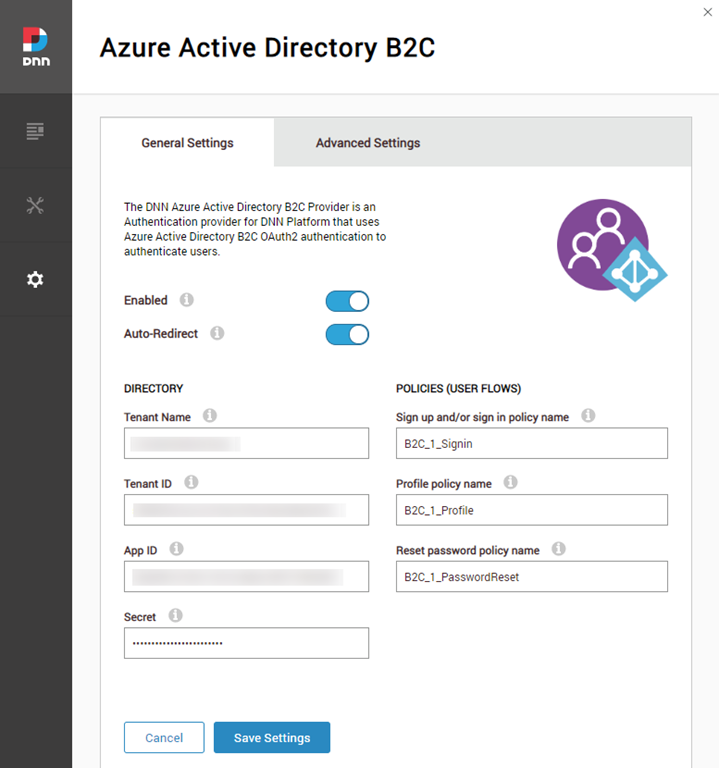
  • Provides DNN Platform - Azure AD B2C integration by portal, so each portal on a DNN installation can setup their own Auth settings
  • Allows auto-redirection, so users are automatically redirected to the Azure AD B2C login without seeing the DNN login page
  • Supports the following policies (user flows):
    • Sign up/Sign in: users can register on Azure AD B2C and then login, or just login
    • Profile: users can update their user profile when clicking on the DNN user profile link
    • Reset password: users can initiate the reset password flow by clicking on the "forgot password" link available on the login screen
  • When a user login on Azure AD B2C, the B2C profile and roles are synchronized with DNN profile and DNN roles. If a role doesn't exist, is created in the process
  • Supports User profile picture synchronization as part of the profile synchronization
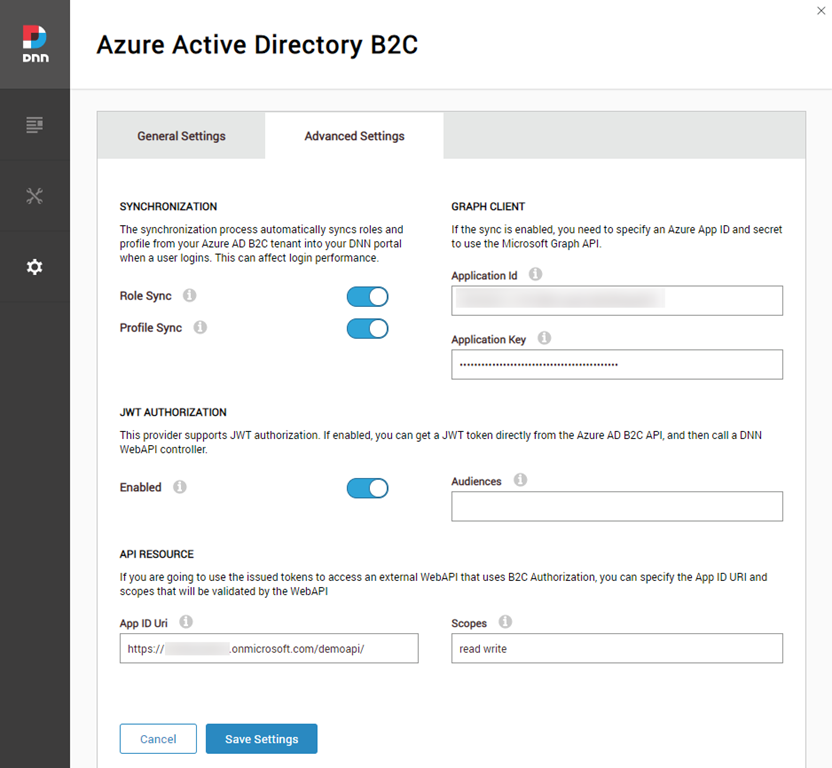
  • Supports JWT authorization. If enabled, developers can get a JWT auth token directly from Azure B2C login using the "Resource Owner" policy, and then use that token to call any DNN WebAPI Controller with the Auth scheme "JWT".
  • Supports for 3rd party WebAPI integration through API Resource and scopes implementation
AzureAdB2C_03
AzureAdB2C_04

Samples

And included with the release, there are some code samples to show some advanced integration features with other non DNN apps, such as mobile apps, JWT auth, etc.
  • Hello sample: simple console App, that allows you to login with a username and password into Azure AD B2C, and then call a DNN WebAPI controller
  • External Webpp and WebAPI with B2C: slight modified version of the sample available on the Microsoft Azure B2C repo samples, with a webapp and a webapi consuming Azure AD B2C. Modification to setup CORS, to allow the DNN module example work with the webapi.
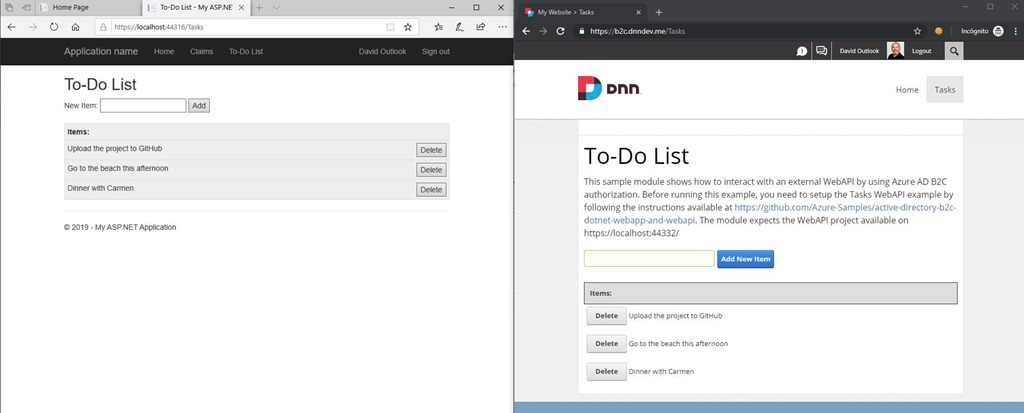
  • MVC/SPA DNN module with WebAPI client: a To-do list DNN module example, that calls an external WebAPI by using B2C JWT tokens.
Todo
This is the first release of the module, so expect new features coming soon. If you see any missing feature, let me know or just do a pull request. Any help is welcome!

jueves, 21 de febrero de 2019

Automating Azure Application Gateway SSL certificate renewals with Let’s Encrypt and Azure Automation

LoveAppGatewayLetsEncryptLet’s Encrypt is a FREE, automated and open Certificate Authority brought to you by the non-profit Internet Security Research Group (ISRG) and supported by big corps such as Google, Facebook, Microsoft, and many others, to have a more secure and privacy-respecting Web.

Many websites and services are already using it worldwide. If you can get SSL certificates issued by a well-known CA for free, there is no excuse to use HTTPS on your website and be secure by default. The process of issuing a Let’s Encrypt certificate can be automated by using a piece of software that uses the ACME protocol, which typically runs on your web host. These certificates normally expire in no longer than 3 months (something that increases the security of the system), so you need to automate the renewals to avoid the manual renewals.

A good example of this implementation is the Azure App Service Let’s Encrypt extension, that automates the renewals by using a webjob. You can read more about it at this Scott Hanselman’s blog post.

When using an Azure Application Gateway, one of the things you need to do is to install the SSL certificate on the gateway. You probably want to implement SSL offloading, so all the resources needed to secure the communication channel is handled by the gateway and not by the servers behind.

On this post I’m going to explain just this scenario, showing how you can automate the Let’s Encrypt SSL renewals on an Azure Application Gateway. Special mention to Ricardo León from Intelequia, who worked on the implementation shown below.

The renewal process explained

Diagram

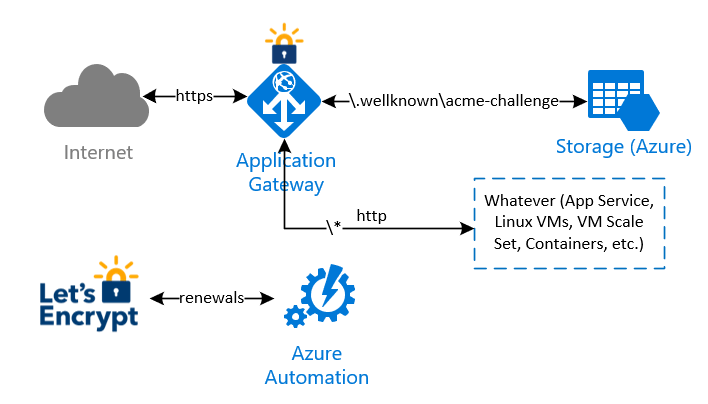
The idea behind this implementation is to avoid any modification on whatever infrastructure is behind the Application Gateway, to complete the renewal checks and validations made by Let’s Encrypt process. In summary:

  1. an Azure Automation runbook will be executed in a schedule (i.e. once every two weeks) to renew and install the current Let's Encrypt certificate.  Let’s Encrypt needs to validate the domain ownership, so it returns a challenge code which is stored by the runbook on a storage account behind the application gateway;
  2. a special rule on the Application Gateway redirects the validation check coming from Let’s Encrypt to the storage account, so the domain ownership check is successful
  3. the Azure Automation runbook finally downloads the new certificate and install it on the Application Gateway

Note that with this implementation, there is no need to manipulate any other infrastructure behind the Application Gateway. 

Issuing and installing the Let’s Encrypt certificate the first time

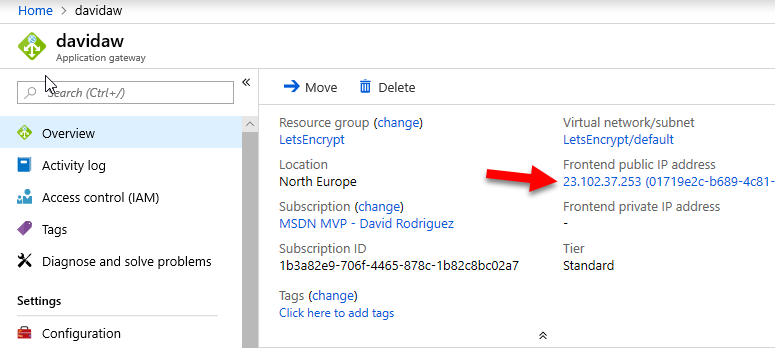
I wanted to issue and automate the renewals of Let’s Encrypt certificates for “api.davidjrh.com”. Note that I had already a DNS record of Type A targeting my Application Gateway.

Step12

C:\>nslookup api.davidjrh.com
Servidor:  google-public-dns-a.google.com
Address:  8.8.8.8

Respuesta no autoritativa:
Nombre:  api.davidjrh.com
Address:  23.102.37.253

To implement the Let’s Encrypt renewal process to issue new SSL certificates on the Application Gateway, follow these steps:

Create a Storage Account

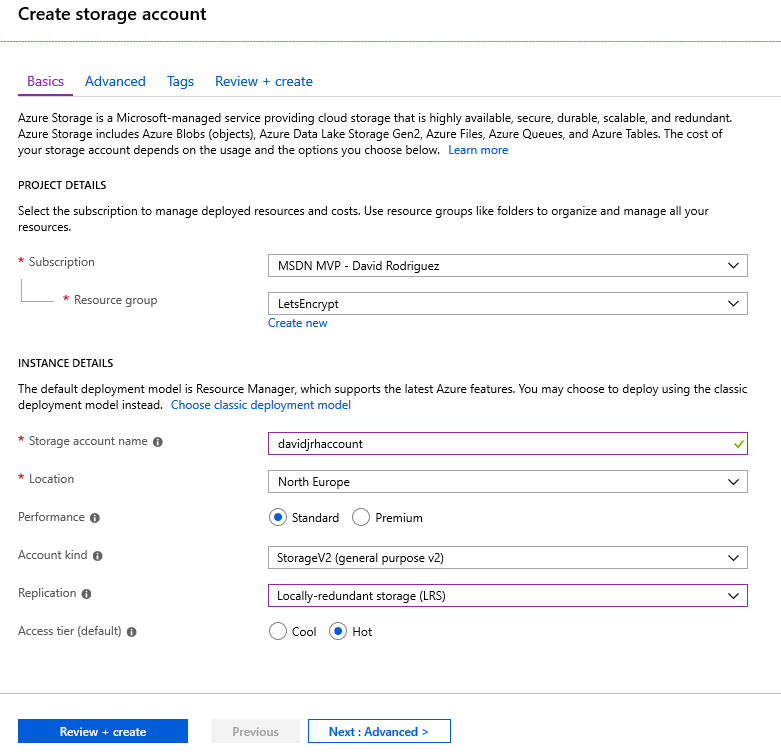
1. Create an Azure Storage account that will be used to host the challenge requests for the DNS domain ownership check. Use the cheapest parameters such as “Standard performance” and LRS.

Step3

2. Once the storage account is ready, create a “public” container with “public blob” permissions

Step4

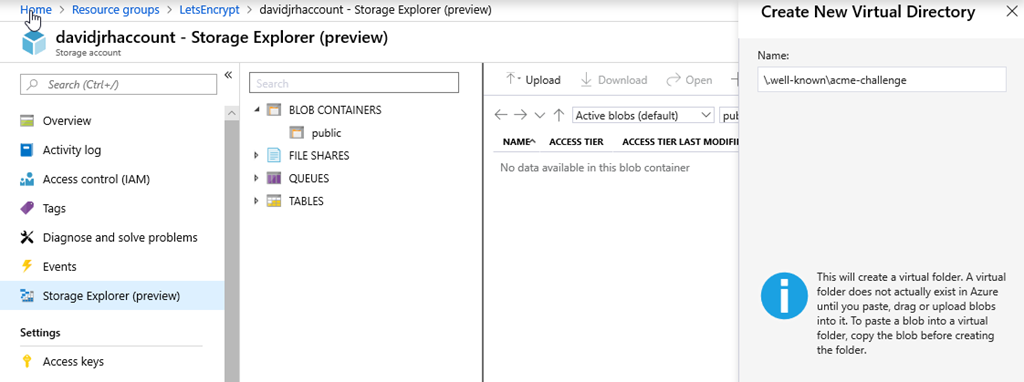
3. Create the virtual directory “\.well-known\acme-challenge” using the Storage Explorer tool.

Step5

Modify the Application Gateway to redirect ACME challenge requests to the storage account

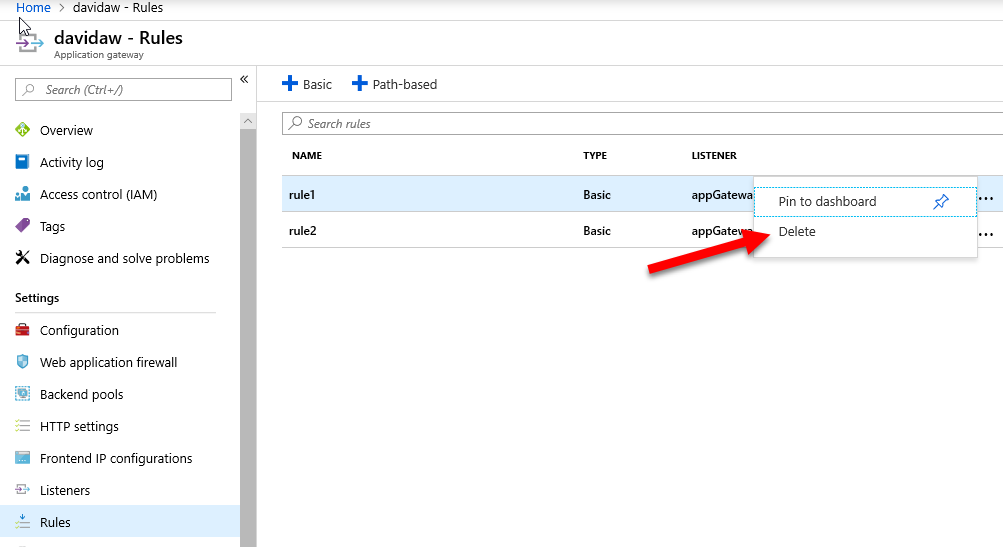
4. When you created the Azure Application Gateway, you probably specified a HTTP rule that was associated to an http listener. In this case, you need to delete that rule that will be replaced by a Path-based rule as shown in the next step

Step8

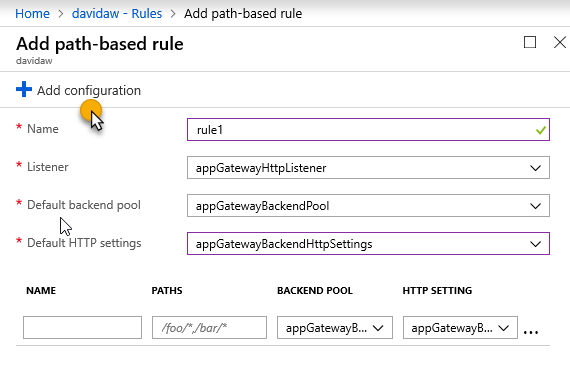
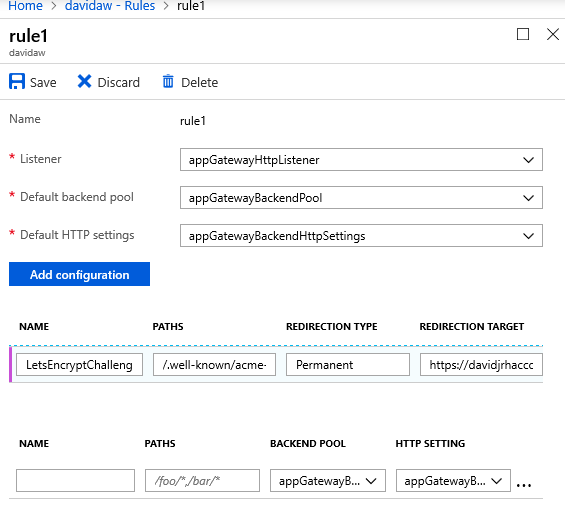
5. Create a new path-based rule that redirects the requests that will be made by Let’s Encrypt on the renewal process with the following configuration:

Step8

6. Set the parameters you had on the http rule, and click on “Add Configuration”

Step13

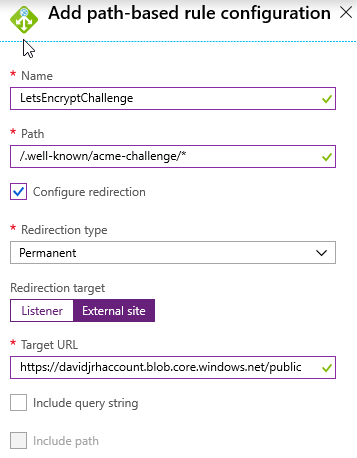
7. Specify the configuration parameters with the path “/.well-known/acme-challenge/*” with a redirection (Permanent), targeting an external site with the storage account container URL you created before:

Step14

Step16

9. Test the rule by creating a file called “test.html” on the storage account and browsing the URL /.well-known/acme-challenge/test.html">/.well-known/acme-challenge/test.html">http://<yourdomain>/.well-known/acme-challenge/test.html

Step17

If everything was setup correctly, when browsing the URL, the application gateway should redirect your browser to the storage account as shown below. Don’t continue until you have successfully setup the redirection rule.

Step18

Installing the Let’s Encrypt certificate by the first time on the Gateway

To install the Let’s Encrypt certificate on the gateway the first time, you have to issue it first. There are several ways to issue the certificate, but the easiest one is to use Certbot, a tool available on GitHub and built on Python that allows you to obtain certs from Let’s Encrypt. There are other clients, so you can probably share better ideas on the comments area of this post.

I normally use a Windows 10 PC as development environment, and the process to install the tool is described on this link, that basically shows how to install Python and then run “pip install certbot”. But since I had the Linux subsystem enabled on my Windows laptop running Ubuntu, so I followed this other approach:

  1. Opened a bash console on the Linux subsystem
  2. Installed Python with “sudo apt-get install certbot”
  3. Executed the following command to only issue the certificate locally in manual mode, by registering an account with my e-mail address on Let’s Encrypt service and issuing a certificate for domain “api.davidjrh.com” agreeing to the Terms of Service:
    sudo certbot certonly --email davidj@intelequia.com -d api.davidjrh.com --agree-tos --manual
    Step11
  4. Followed the screen instructions and created the file on the storage account with the required contents
    Step20
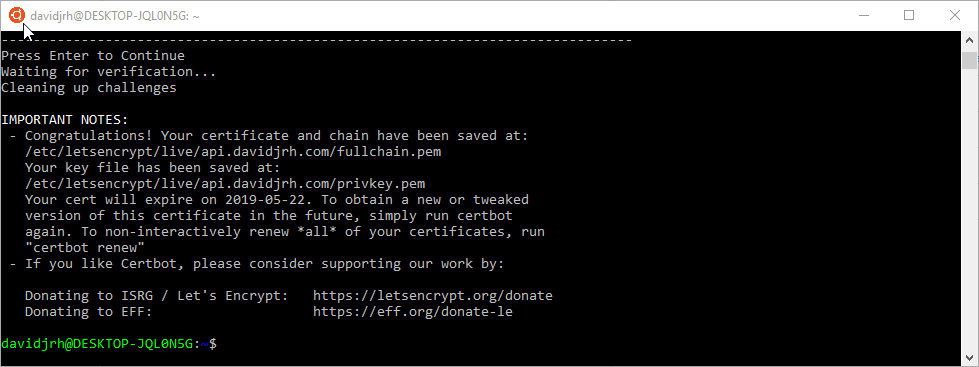
  5. Successfully issued the certificate

davidjrh@DESKTOP-JQL0N5G:~$ sudo ls /etc/letsencrypt/live/api.davidjrh.com
README  cert.pem  chain.pem  fullchain.pem  privkey.pem

The certificate, chain and key are issued in .pem format, so to upload the certificate in .pfx, I used OpenSSL to convert from PEM to PFX:

Step21

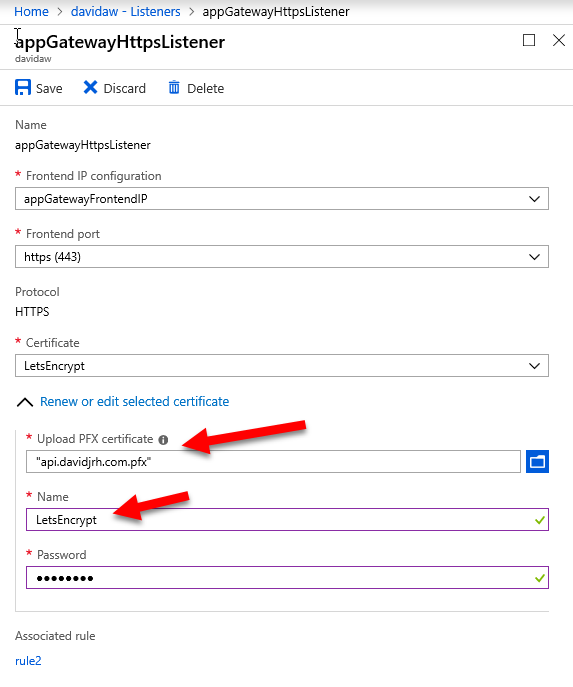
Finally, I modified my current HTTPS listener to use the LetsEncrypt certificate. IMPORTANT: remember the name you are going to give to this certificate, since you will need to specify it as a parameter on the renewal process later

Step22

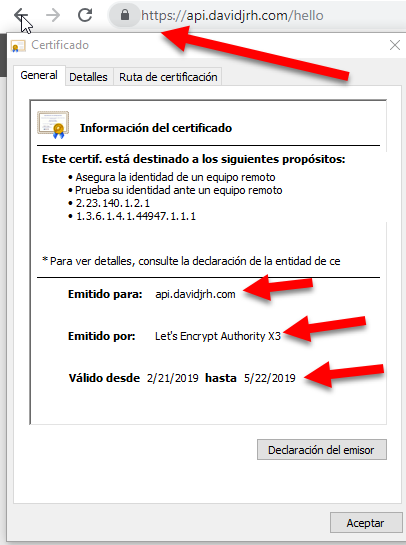
After applying the changes, you can check that the LetsEncrypt SSL certificate is working properly just by browsing a resource via HTTPS

Step23

Implementing the renewal process

Now that the LetsEncrypt certificate is installed and working properly, the next step is to automate the renewals. Let’s do it with an Azure Automation runbook.

Create an Automation Account

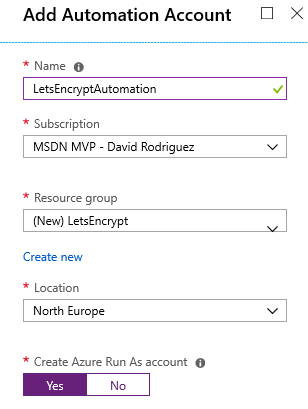
1. On the Azure Portal, create an Azure Automation account (or use an existing one) to host the runbook. Note that you can create this automation account and run up to 500 minutes per month for free.

Step1

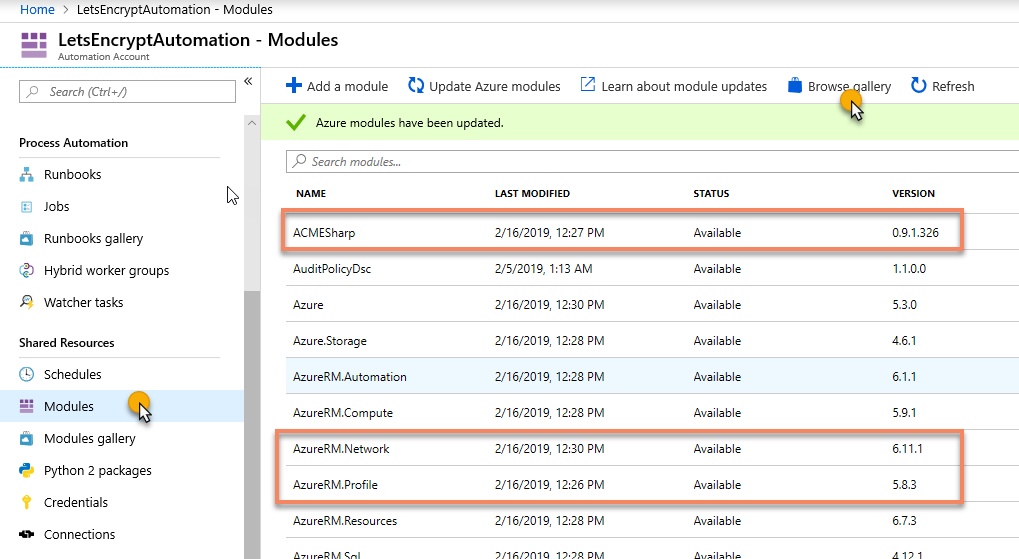
2. Inside the Automation resource, open the Modules and browse the gallery to import the following modules: 'AzureRM.profile', 'AzureRM.Network' and 'ACMESharp'. Ensure you import the latest version of all of them and update the current ones already imported (for example, the AzureRM.profile is enabled by default, but we need the latest version available on the gallery).

Step2

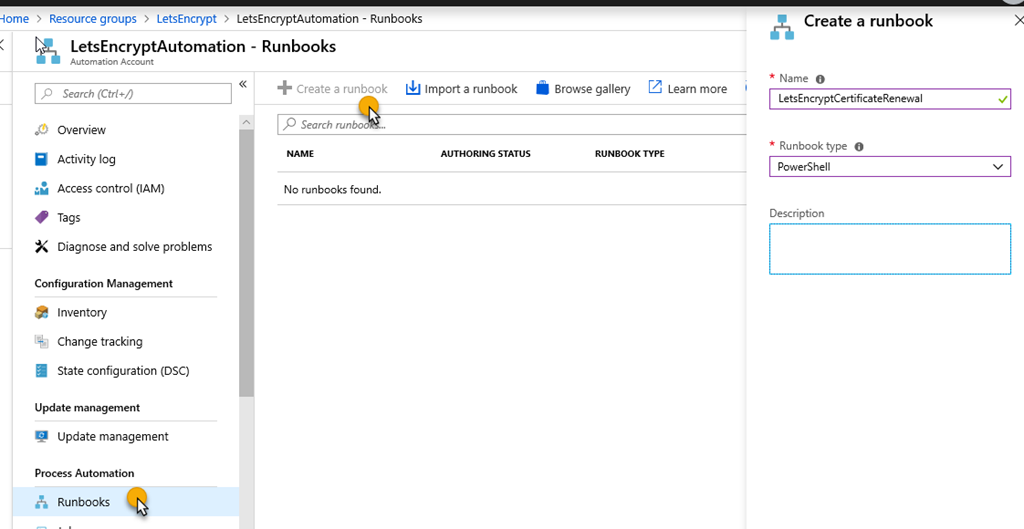
3. On the Azure Automation account, create a PowerShell runbook called LetsEncryptCertificateRenewal

Step6

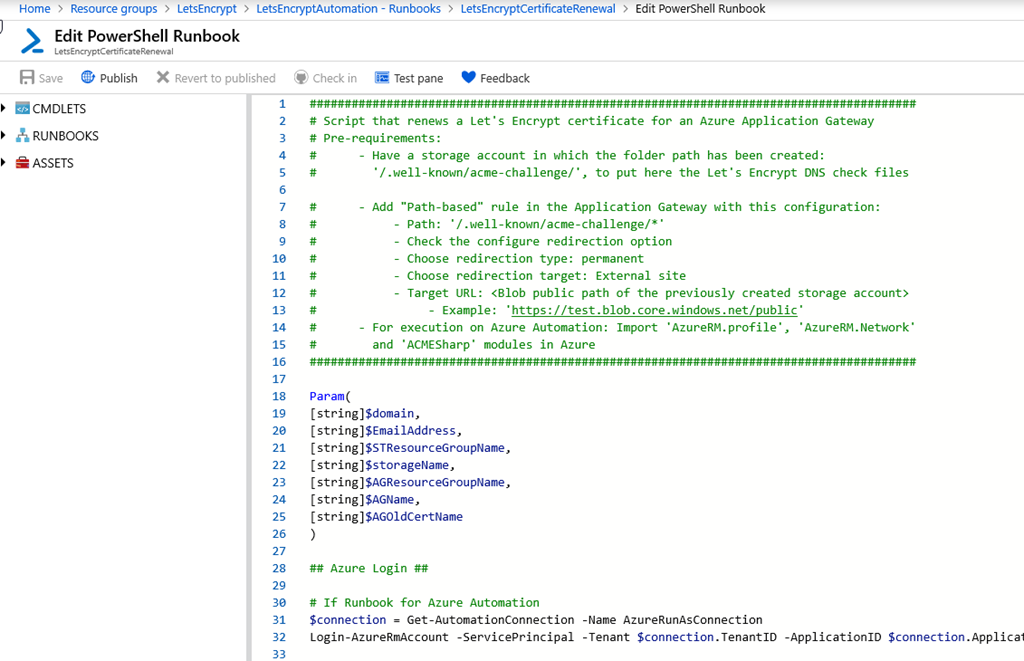
4. Edit the powershell runbook and paste the contents of the script available at GitHub on https://github.com/intelequia/letsencrypt-aw/blob/master/letsencryptaw_v2.ps1, and click on the “Publish” button to make it available for scheduling

Step7

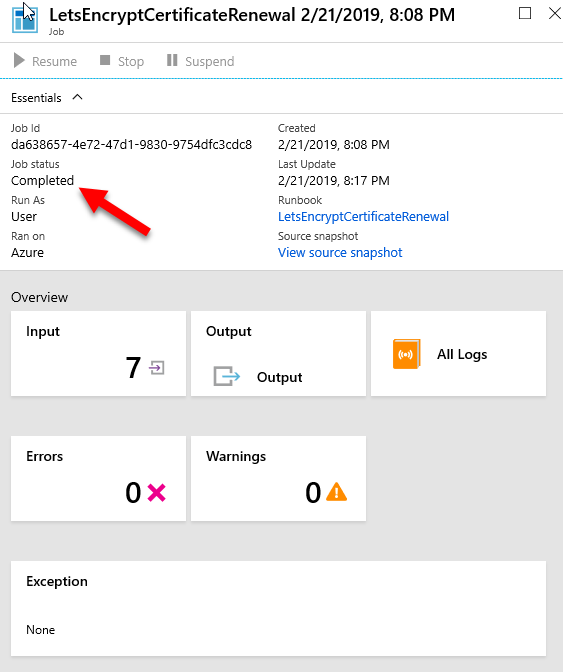
You can test the runbook on the Test pane, and passing the required parameters (domain name, email address used on LetsEncrypt,  resource group names, storage account name, application gateway name and the name of the certificate you used when setting up the https listener). It takes around 15min to complete. When browsing the site again with https, you will notice that the certificate was updated correctly.

IMPORTANT: LetsEncrypt has its own weekly limits when issuing certificates for a specific domain in production (50 per week), so be aware when testing the PowerShell script.

Step26

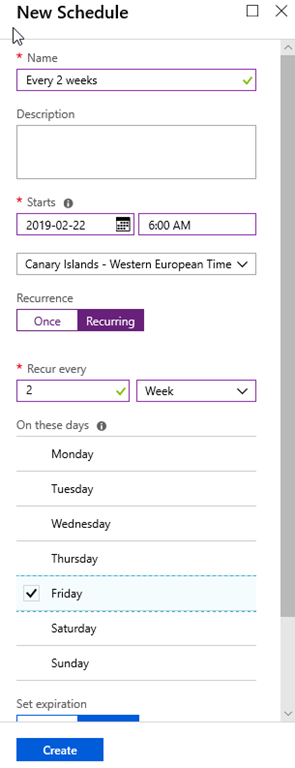
5. Create an Azure Automation Schedule to renew the SSL certificate. In my case, I created a schedule for renewing it every 2 weeks

Step24

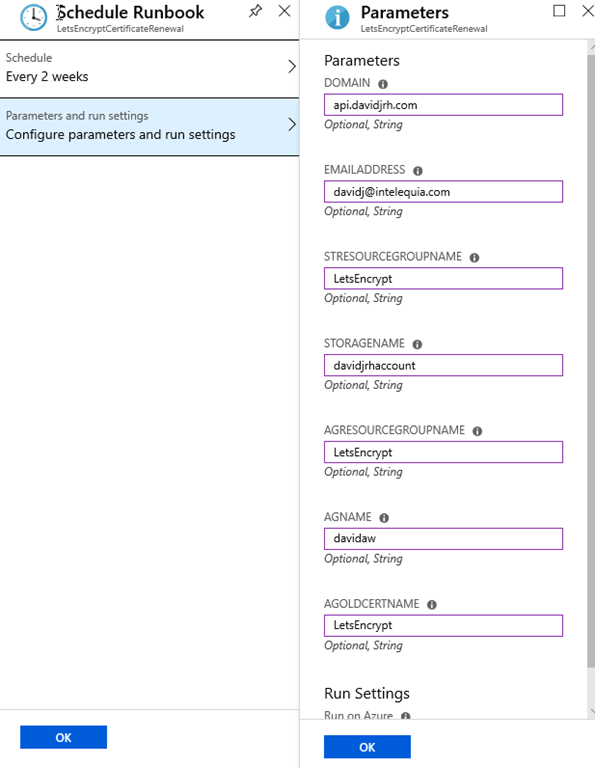
6. Setup the parameters to schedule the runbook with the schedule you created before.

Step25

And that’s all. Now you have setup the autorenewals of your Application Gateway SSL certificate with Azure Automation.

domingo, 13 de enero de 2019

[Podcast] La nube, inteligencia artificial y otros temas en Ycoden Daute Radio

El pasado martes 4 de diciembre tuve el placer de disfrutar de unos minutos de radio en Ycoden Daute Radio en compañía de Narciso Ramos, en los que hablamos de la nube, inteligencia artificial y algunos otros temas. Les dejo con la grabación del programa por si alguno se lo perdió.
EntrevistaYcodenDauteRadio
Un saludo y Happy Coding!

lunes, 24 de septiembre de 2018

Novedades desde Microsoft Ignite

IgnitePues hace tiempo que no añadía ninguna entrada al blog y hoy estaba decidido a crear una a partir de los anuncios de la conferencia Microsoft Ignite que está desde hoy 24 hasta el 28 de septiembre en Orlando. Todas las keynotes, sesiones y comentarios de las mismas están disponibles nada más finalizar...¡con lo que el trabajo se acumula!
Y vaya que si se acumula, no tienes más que mirar la lista completa de anuncios que se acaba de revelar para que te hagas una idea. Si me pongo a explicar cada una de las novedades, llega el fin de semana y aún no he terminado. Así que mejor hago un resumen de las que personalmente me han hecho más gracia o me han resultado de más interés (insisto, siempre desde el punto de vista personal) porque me afectan más en el día a día o porque van relacionadas con proyectos de clientes con los que trabajo. Recuerda, no dejes de echar un vistazo a:
Aquí va mi resumen personal.

Azure Front Door Service Public Preview

FrontDoorEste es el primero de los servicios anunciados, el Azure Front Door (aún no tengo claro si es “Front Door” o “Frontdoor” ya que lo he visto escrito de las dos formas) es el punto de entrada para el despliegue rápido de aplicaciones web basadas en microservicios, a través de un panel de control centralizado desde el que controlar y monitorizar el tráfico de los mismos.
Una de las características más interesantes es que para mantener seguros tus servicios, Azure Front Door es capaz de detener ataques a nivel de red y aplicación con protección DDoS, además de implementar características de balanceo HTTP y reglas basadas en rutas.
Para más información acerca de Azure Front Door service visita esta página.

Azure Ultra SSD | Ultra SSD – Public Preview

DisksEsto sí que me parece la caña. Si ya teníamos discos administrados HDD y SSDs Premium, y a los que hace poco se han sumado los SSDs Standard, Microsoft se ha sacado de la manga algo de lo que no se para de hablar en todos los corrillos. Y es que no es para menos, se nos une a la familia los Ultra SSD que, ojo al dato, estas son sus características:
  • Tamaño desde 4GB hasta 64TB
  • Consigue el rendimiento óptimo que necesitas por disco incluso para capacidades pequeñas de almacenamiento
  • Escala hasta 160.000 IOPS y un rendimiento de 2GB/s por disco sin reiniciar las máquinas virtuales
Sí, leíste bien, 160.000 IOPS. Esto definitivamente es lo que se denomina un “Game Changer” en muchos escenarios en los que hace falta ese rendimiento extra que hasta ahora solo se conseguía on-premises.
Para más información visita el blog del equipo de ingeniería y la página de Azure Disks.

Azure Virtual Network TAP

Este servicio viene a resolverme un escenario en el que se requería usar un Network Virtual Appliance de terceros sin ser invasivo. En resumen lo que hace el servicio es hacer una copia del tráfico de una Red Virtual a un recolector de paquetes. El tráfico “mirror” es una copia profunda del tráfico entrante y saliente de una máquina virtual y que puede ser reenviado a una dirección IP o a un balanceador de carga interno en la misma red virtual o emparejada.
Más información en la página de Network Appliances.

Azure Firewall con disponibilidad general

Siguiendo con lo anterior, el servicio de Azure Firewall sale con disponibilidad general. El servicio te ayuda a proteger los recursos de tu red virtual, siendo un firewall-as-a-service con características de alta disponibilidad y sin restricciones de escalabilidad. Se pueden crear, forzar y monitorizar aplicaciones y políticas de conectividad de forma centralidad a través de distintas suscripciones y redes virtuales.
Más información en la página de Azure Firewall.

Windows Server 2019

¡Queremos Windows Server 2019! ¿Para cuándo? ¡Para ya! ...¡Hecho!
792px-Windows_Server_2019_logo.svg
Otro de los anuncios importantes de hoy es el lanzamiento de Windows Server 2019, la nueva versión del sistema operativo de servidor que hará de puente entre los entornos on-premise y Azure habilitando de forma inédita los escenarios híbridos y maximizando las inversiones existentes, incluyendo las áreas siguientes:
  • Capacidades híbridas únicas con Azure;
  • Seguridad avanzada multi-capa;
  • Innovación más rápida para aplicaciones;
Vale, todo esto muy interesante, pero ¿para cuándo va a estar disponible? Siempre estábamos acostumbrados a aquellas CTPs, RCs, luego RTM, luego...pues mira como ha cambiado la cosa, que sale el mes que viene. ¿En octubre? Sí, la versión definitiva. Así que ve calentando motores :)
Para más información.

SQL Server 2019 Preview

Pues como no hay dos sin tres, también se ha anunciado la primera CTP pública de SQL Server 2019. Por primera vez, SQL Server viene con capacidades de big data, con Spark y Hadoop DFS, yendo más allá de los que nos tiene acostumbrados con las bases de datos tradicionales. Además viene con una característica de virtualización de datos (Polybase) que permitirá consultar otras bases de datos como Oracle, Teradata y Mongo DB directamente desde SQL Server sin necesidad de copiar o mover los datos. Todo ello por supuesto en Windows, Linux y contenedores.
Para más información http://aka.ms/ss19 

Azure Bot Service con disponibilidad general

Microsoft-Luncurkan-Azure-Bot-ServicePues este es otro de los anuncios que me ha hecho bastante tilín, y es que ya había pasado bastante tiempo desde el anuncio del Microsoft Bot Framework v4 SDK, y al no estar listo para producción nos fastidiaba mucho el ver las características que se estaban implementando (por ejemplo, ni más ni menos que usar .NET Core), pero que no podíamos usar a no ser que quisiéramos correr con los riesgos oportunos.
Eso sí, ahora toca el tema de migración de bots existentes en el Framework anterior, etc. pero es algo que se ha esperado como agua de mayo que por cierto, que lo anunciaron por primera vez en Mayo en el Build :P
Puedes leer más información en este post.

Windows Virtual Desktop (en Azure como servicio) – Private Preview

Este sin duda es uno de los anuncios que personalmente más gracia me ha hecho, precisamente por el trabajo que hemos estado haciendo en algunos clientes de Intelequia en los últimos años. ¡Si hasta incluso es el tema sobre el que Elena Salcedo y el menda hablamos en el pasado Azure Bootcamp para poder montarte todo este chiringuito por tu cuenta! (si quieres revivir esos momentos, aquí tienes disponible la grabación de “Implementando Remote Desktops autoescalables en Azure”).
Por ahora el servicio se ofrece en vista preliminar privada, por lo que puedes apuntarte aquí si quieres probar el servicio.

Otros anuncios

Otros anuncios que también me han tocado la fibra:
  • ExpressRoute Direct: conéctate al backbone de Microsoft a 100Gbps;
  • Azure Functions – soporte para Python: ya está disponible en versión premilinar;
  • Azure DDoS nuevas características: informe en tiempo real de los ataques;
  • Soporte para registros A/AAAA en Azure Traffic Manager (por fin!);
  • ACR (Azure Container Registry): disponibilidad general de la característica de Build, soporte para repositorios Helm, vista preliminar del soporte de OCI y varios más;
  • AKS (Azure Kubernetes Service) en Azure Stack: que puedes comenzar a comenzar a desplegar hoy mismo;
  • Máquinas virtuales NVv2: para visualización remota, con el doble de memoria que las anteriores máquinas NVIDIA;
  • Azure Digital Twins: otro de los anuncios interesantes de este día, una plataforma de nube, IA e IoT para permitir a las organizaciones crear un “gemelo” digital que modela virtualmente la relación entre personas, lugares y dispositivos en un entorno físico. Esto va a dar para una entrada en el blog por separado, por lo que no voy a profundizar más en esta;
  • Azure Redis Cache: ahora soporta hasta 120Gb de caché en el tier premium;
  • Azure SQL Data Warehouse:
    • Restore Points: ahora puedes crear puntos de restauración definidos por el usuario para iniciar un snapshot antes de hacer operaciones significativas en el data warehouse;
    • Intelligent Insights: recomendaciones para asegurarte de que tu data warehouse está optimizado para rendimiento;
  • Azure Database for MySQL y PostgreSQL:
    • recomendaciones basadas en el aprendizaje de las cargas de trabajo, similares a las que ya teníamos en SQL Database (ejemplo, creación de nuevos índices);
    • Query Performance Insights: lo mismo que ya teníamos para SQL Database, pero ahora también para estas bases de datos, permitiendo ver consultas que tarden mucho, etc;
    • Query Store: característica similar a la que tenemos en SQL Server, para almacenar las estadísticas de ejecución de consultas y eventos de espera, lo que permite las dos características que mencioné arriba;
    • Protección de amenazas: también algo que teníamos en SQL Database, permite la detección de amenazas detectando patrones en las consultas, parámetros, etc. Se integra con Security Center;
  • Azure SQL Database Hyperscale: pues hasta 100TB por base de datos, casi nada;
  • Azure Premium Files: vista preliminar del servicio de Azure Files pero montado sobre unidades SSD.
  • Microsoft Learn Platform: Presentación de un nuevo enfoque de rutas de aprendizaje basado en roles. Ya está disponible el contenido para roles de Azure, y próximamente se unirán más. Más info en https://docs.microsoft.com/es-es/learn/
Pues no quería extenderme y al final me he liado como siempre. Estoy seguro de que me dejo mil cosas, pero en definitiva quería hacerme este auto-resumen para poder visitarlo de vez en cuando. Espero que les sirva de algo también.
Un saludo y happy coding!

miércoles, 2 de mayo de 2018

Jornada: Microsoft Azure en Educación e Investigación

cartel_A3El próximo 10 de mayo de 2018, en el Aula 1.4 de la Escuela Superior de Ingeniería y Tecnología, tenemos la suerte de tener al equipo de Educación de Microsoft España en Tenerife para presentarnos una jornada sobre Microsoft Azure en el  ámbito de la Educación y la Investigación.

Estas jornadas tienen como objetivo mostrar a los usuarios, instituciones y empresas de Canarias diversos proyectos y experiencias de gran interés relacionados con la tecnología de computación en la nube utilizando la plataforma Microsoft Azure. Desde la Universidad de La Laguna, y a través del Grupo Taro en colaboración con diferentes empresas, se ha comenzado una línea de trabajo para proporcionar un conocimiento en el uso de tecnologías en el ámbito de las TIC así como en el desarrollo de proyectos conjuntos con empresas e instituciones que permitan ser competitivos desde Canarias.

Para acceder al evento necesitarás estar registrado siguiendo este enlace:

Regístrate aquí al Evento

Desde Intelequia hemos preparado conjuntamente con Microsoft una serie de sesiones para mostrar algunos aspectos de la plataforma de Microsoft Azure orientados a sacar el máximo rendimiento en ámbitos educativos y de investigación. Entre las sesiones tendremos la suerte de contar de nuevo con Sebastián Hidalgo, investigador del IAC, para contarnos los detalles de uno de los proyectos sobre el que ha estado trabajando, “The Secret Life of the Galaxies: Unveiling the true nature of their star formation” y que fue presentado el año pasado en Madrid a través del evento Global Azure Bootcamp, en el que más de 10.000 participantes colaboraron en el mismo a través de una granja de cómputo a nivel global.

SELIGA

Aparte de esa sesión, la agenda está llena de interesantes charlas sobre inteligencia artificial y de cómo serán las aplicaciones del futuro, un futuro que ya está aquí.

  • 9:30-9:45 Bienvenida | Óscar Sanz (Director de Educación) | Microsoft
  • 9:45-10:30 La vida secreta de las galaxias: desvelando la naturaleza de su formación estelar | Sebastián Hidalgo (Investigador) | Instituto de Astrofísica de Canarias (IAC)
  • 10:30-11:15 Construyendo las apps del futuro | David Rodriguez (CTO) | Intelequia
  • 11:15-11:30 Pausa café
  • 11:30-12:15 Contenedores, Kubernetes, y el nuevo modelo de DevOps en la nube | Diego Martinez (Solution Specialist) | Microsoft
  • 12:15-13:00 Azure Computer Vision and Tensorflow | Alexander González (Microsoft Student Partner) | UEM
  • 13:00-13:45 Cómo intenté hacerme rico con la nube y fracasé estrepitosamente | Alberto Marcos (Responsable de Universidades) | Microsoft
  • 13:45-14:00 Cierre | Óscar Sanz (Director de Educación) | Microsoft

¡Nos vemos el 10 de mayo!

Related Posts Plugin for WordPress, Blogger...